What are Agent Skills in Claude Code and Codex?
You have probably already experienced, that even with the best models you still need really good context and prompts to get the best results. This problem is being more and more tackled by modern agents like Claude Code, but sometimes you still end up copy and pasting documentation, or by writing a lot of explanations. Agent Skills are a new open format that aims to help with this. They work in most of the assistants like Claude Code, Gemini, Code, etc.
A skill is basically just a markdown (plain text) file, potentially with a few attachments or additional scripts. Once you (or an AI) create and install a skill, the agent can automatically access it. This is really helpful for knowledge that is specific to your project or use case, for example
- Specific domain knowledge.
- Repeatable workflows with multiple steps, for example deploying a project.
- Theming/style of your website and app.
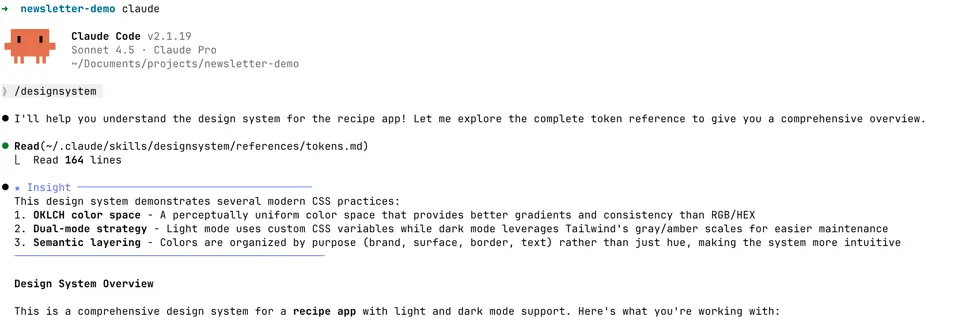
Skills are nice because you can either install pre-made skills by other people, or create your own. For example I have created a skill called /designsystem for my recipe tracker, which includes all the colors, fonts, and other design decisions.
When I create a new view for the app, I can just write /designsystem, so the context is loaded in, and Claude Code can create a design that fits to the rest of the app (mostly).
For creating skills yourself, I first recommend installing the demo skills by Anthropic, those also include a skill-creator skill that is very helpful for creating custom ones.
Aside: Skills should have the ability to be loaded in automatically (based on the description). I have not found this to work, Opus just doesn’t seem to want to load them in. Therefore, I just manually type in the commands of the skills I want to use in a given session.